
Renamer
AI Assist: describe what you want, get a workflow
Not on macOS? Download for Windows
Renamer 7 includes a local AI model that turns plain-language descriptions into renaming workflows. Type "convert names to lowercase" or "remove spaces and add numbering" and Renamer builds the actions for you. Everything runs on your computer.
Rename thousands of files at once with reusable workflows. Use AI Assist when you're not sure how to start.
Rated 96% by 1,019 users on Setapp.
The problem with batch renamers
Powerful renamers have a learning curve. To rename a folder of files, you need to know which actions exist, in what order to chain them, and what settings each one needs. For someone who renames files once a month, that's a lot of context to keep loaded in your head. The first ten minutes with any batch renamer are usually spent reading documentation.
AI Assist is for people who know what they want the result to look like, but don't want to figure out which sequence of actions gets them there.
How it works
Creating a workflow with AI Assist takes four steps.
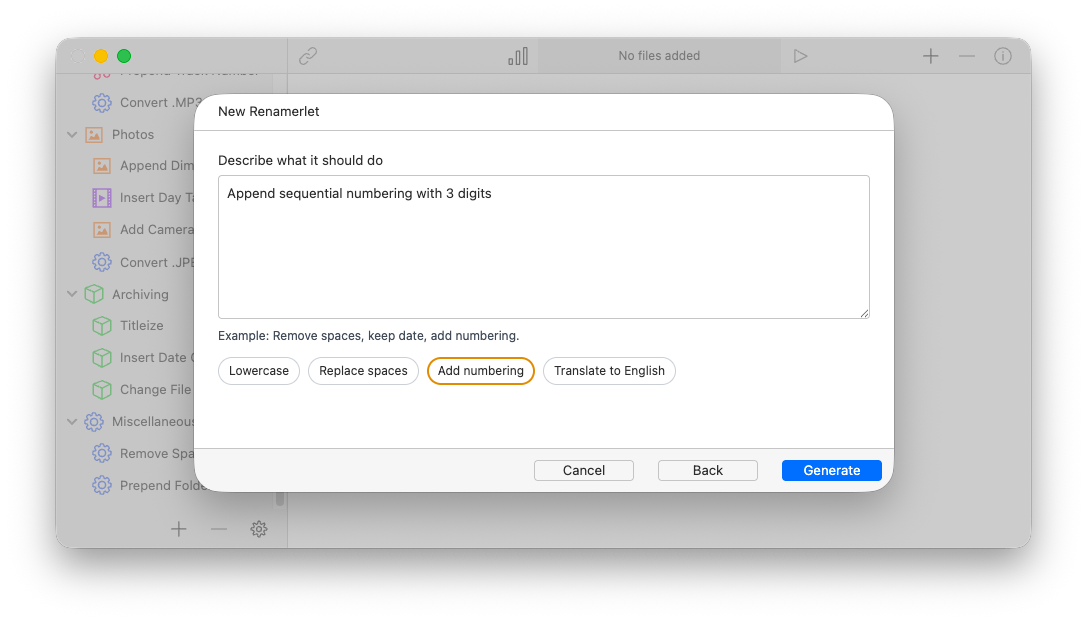
- Open AI Assist
Click the + button to create a new Renamerlet and choose AI Assist mode. The dialog shown above opens. - Describe what you want
Type a plain-English description in the field: "convert names to lowercase," "remove the date prefix and add sequential numbering," "rename photos using the date the photo was taken." Or pick one of the one-click prompts (Lowercase, Replace spaces, Add numbering, Translate to English) if your task matches. - Hit Generate
Renamer's local model reads the description and generates the actions in the right order, with the right settings. A simple prompt like "Convert names to lowercase" produces a single Convert Case action. More complex descriptions produce longer chains. - Review and refine
The generated workflow opens in the main UI. You can edit any action exactly as you would a workflow you built by hand. AI Assist is a starting point: nothing is applied until you run it.
Tip: the one-click prompts are fastest for the most common jobs. Use the free-text field for anything more specific.
Runs entirely on your computer
This is the part that matters. AI Assist uses a local language model, downloaded once and run on your machine. Your filenames, your prompts, and the suggestions never leave your computer.
Specifically, the first time you turn on AI Assist, Renamer downloads about 1.8 GB of model data (free, included with the app). After that, AI Assist runs offline. No API calls, no cloud, no Anthropic or OpenAI or Google in the loop. The model is Ministral 3B, running on an embedded llama.cpp inference engine, the same approach used by tools like Ollama and LM Studio, but pre-configured and integrated.
- You can use AI Assist on a plane, on a train, or on any disconnected machine.
- Your filenames are never transmitted, stored on a server, or used to train a model.
- The feature works the same on macOS as on Windows. No platform-dependent cloud quirks.
- There's no per-use cost, no rate limit, no account required.
For anyone wary of "AI features" that quietly upload your data, the answer here is straightforward: nothing leaves your computer.
Learn more about the model Renamer uses →
When AI Assist is useful, and when to skip it
AI Assist is best for situations where you can describe the outcome more easily than you can build the chain. Things like:
- ✦"Replace all spaces with underscores"
- ✦"Convert filenames to lowercase and remove punctuation"
- ✦"Rename these photos by their date taken"
- ✦"Add a number prefix to each file"
For situations where you already know exactly which Renamer actions you need, building the workflow by hand is faster. AI Assist is a starting point for unfamiliar tasks, not a replacement for knowing the tool.
For complex, multi-step renaming logic that involves conditionals or external data (CSV imports, regex with backreferences), the manual workflow editor gives you finer control. AI Assist can scaffold these but you'll usually want to refine the result.
Privacy without compromise
The "AI" features in most software in 2026 quietly send your data to a third-party API. That's fine for some tasks but uncomfortable when the data is your personal files: your photo library, your work documents, your music collection.
Renamer's approach is that AI features should be useful without that compromise. Local inference is slower than calling GPT-4 over an API, but for the kind of structured suggestions AI Assist generates, local is fast enough. A complex prompt resolves in under a minute on most modern machines. Simple ones are nearly instant.
If you'd rather not use AI Assist at all, you don't have to. The model is downloaded only when you opt in, and Renamer's manual workflows do everything they did before.
Not on macOS? Download for Windows